

Choose your mode#
PyMechanical offers two distinct modes for interacting with Ansys Mechanical. This page helps you decide which mode is right for your workflow.
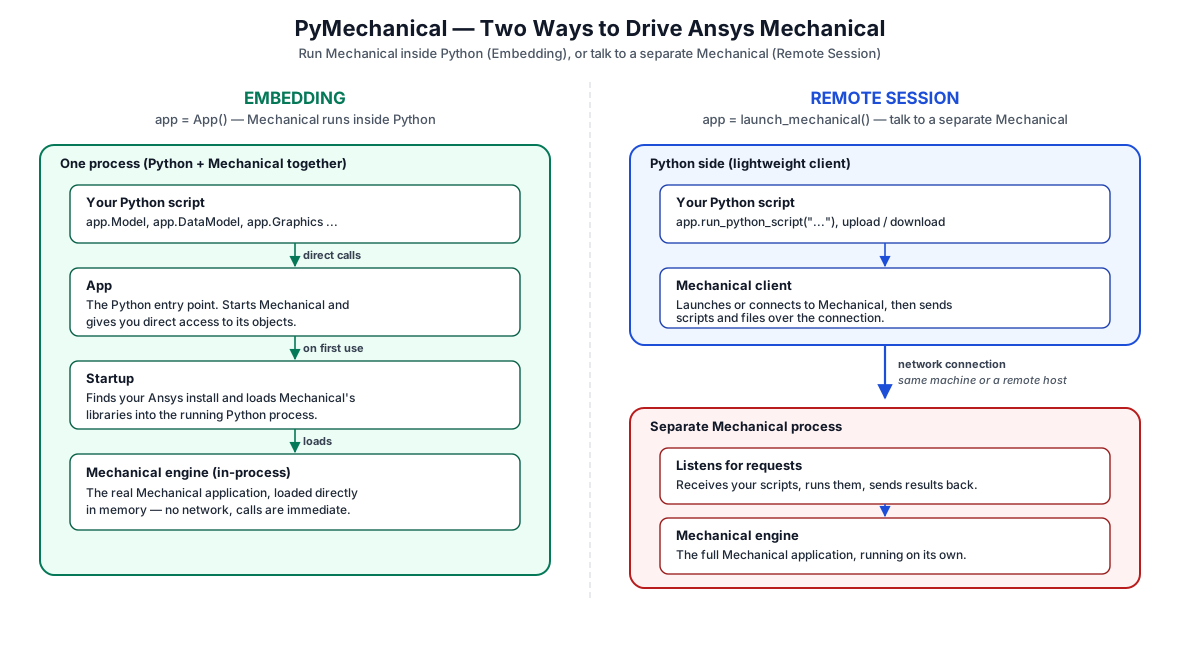
PyMechanical embedding and remote session architectures.#
At a glance#
Aspect |
Embedding ( |
Remote Session ( |
|---|---|---|
Process model |
Mechanical runs inside your Python process |
Mechanical runs as a separate server process |
Communication |
Direct .NET CLR interop (Python.NET) |
gRPC over TCP/IP |
API style |
Direct object access (full CRUD data model) |
String-based via |
GUI support |
No (batch mode only) |
Yes (set |
Platform |
Windows natively; Linux requires |
Windows and Linux |
Concurrency |
One instance per Python process |
Multiple instances with |
Best for |
Jupyter notebooks, interactive scripting, deep integration |
CI/CD pipelines, Docker, distributed automation |
Startup speed |
Faster (in-process) |
Slower (new process + gRPC handshake) |
Object model access |
Full—read, create, update, delete objects directly |
Limited—send scripts as strings, receive results as strings |
Which mode to use?#
Use the following questions to guide your choice:
Question |
Embedding |
Remote |
|---|---|---|
Do you need the Mechanical GUI? |
No (batch mode only) |
Yes (set |
Are you running inside a Jupyter notebook? |
Yes |
No |
Do you need full object model access (read properties, traverse tree)? |
Yes |
No |
Are you deploying in CI/CD, Docker, or containers? |
No |
Yes |
Do you need multiple simultaneous Mechanical instances? |
No |
Yes (pool) |
Do you want the fastest startup with no network overhead? |
Yes |
No |
Do you need to connect to Mechanical running on a different machine? |
No |
Yes |
Are you building a distributed or multi-user system? |
No |
Yes |
Once you’ve chosen your mode, see Launching PyMechanical for launch instructions and code examples for each mode.
How the modes work#
Embedding mode embeds the entire Mechanical app in memory inside your Python process using Python.NET (.NET CLR interop). There is no separate process or network communication. The Mechanical data model is directly available in Python, giving you full CRUD (Create, Read, Update, Delete) access to the object model.
Remote session mode launches Mechanical as a separate server process and
communicates with gRPC (Remote Procedure Call). Python sends commands as strings
using the run_python_script() method and receives results as strings. This provides
process isolation but does not expose the full object model directly.
See also
PyMechanical architecture — Detailed technical architecture
Installation guide — Install PyMechanical
Launching PyMechanical — Launch and connect to Mechanical