
Note
Go to the end to download the full example code.
Topology optimization of a simple cantilever beam#
This example demonstrates the structural topology optimization of a simple cantilever beam. The structural analysis is performed with basic constraints and load, which is then transferred to the topology optimization.
Import the necessary libraries#
from pathlib import Path
from typing import TYPE_CHECKING

from matplotlib import pyplot as plt
import matplotlib.animation as animation
from PIL import Image

from ansys.mechanical.core import App
from ansys.mechanical.core.examples import delete_downloads, download_file

if TYPE_CHECKING:
    pass
Initialize the embedded application#
Ansys Mechanical [Ansys Mechanical Enterprise]
Product Version:261
Software build date: 01/30/2026 18:48:37
Setup the output path and camera#
# Set the path for the output files (images, gifs, mechdat)
output_path = Path.cwd() / "out"

# Set the camera orientation to the front view
graphics = app.Graphics
camera = graphics.Camera

# Set the camera orientation to the front view
camera.SetSpecificViewOrientation(ViewOrientationType.Front)
Import the structural analysis model#
# Download ``.mechdat`` file
structural_mechdat_file = download_file("cantilever.mechdat", "pymechanical", "embedding")

# Open the project file
app.open(structural_mechdat_file)

# Define the model
model = app.Model

# Get the structural analysis object
struct = model.Analyses[0]


# Get the structural analysis object's solution and solve it
struct_sln = struct.Solution
struct_sln.Solve(True)
Display the structural analysis results#
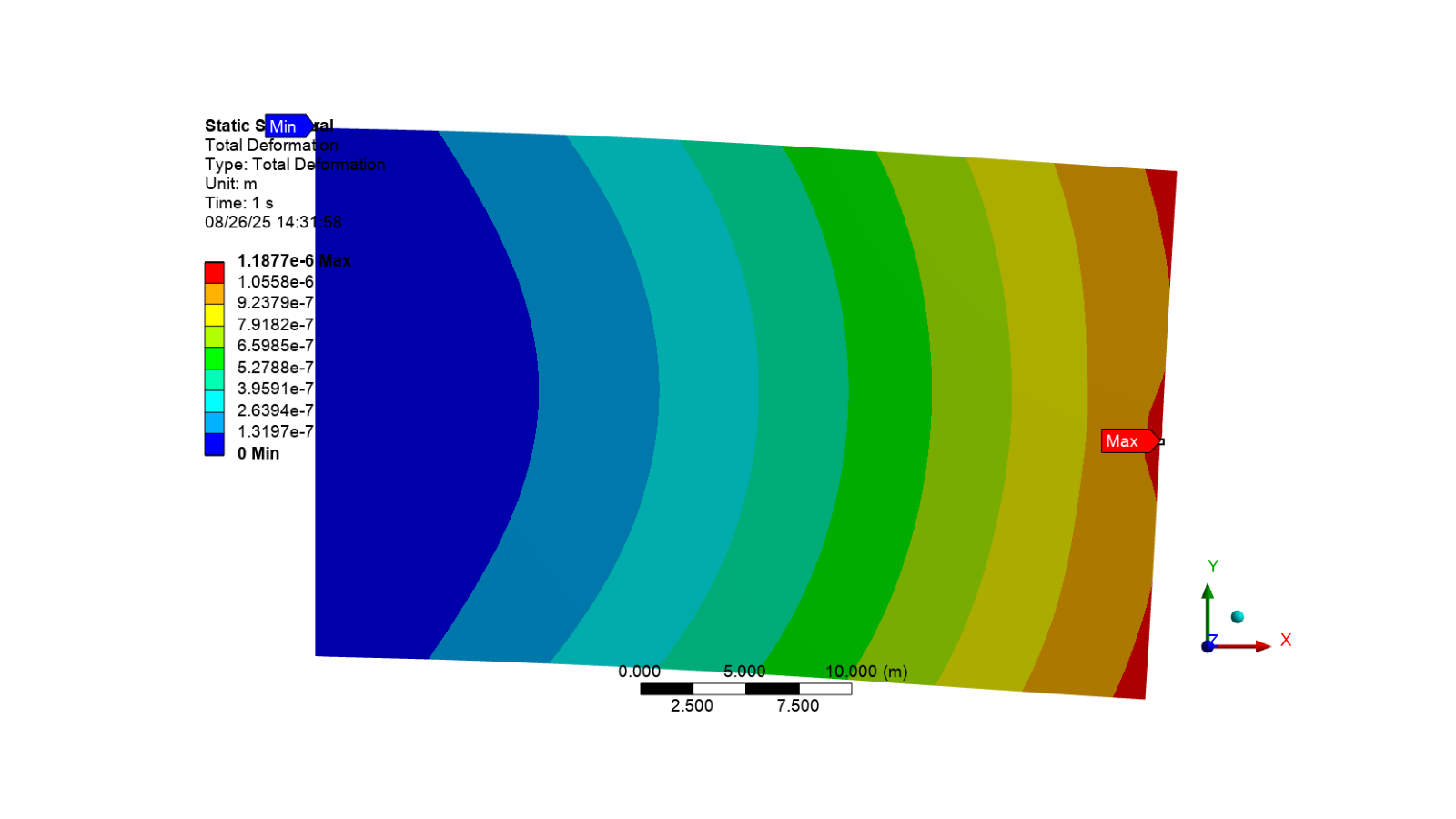
Activate the total deformation result and display the image
struct_sln.Children[1].Activate()
image_path = output_path / "total_deformation.png"
camera.SetFit()
app.helpers.export_image(struct_sln.Children[1], image_path)
app.helpers.display_image(image_path)
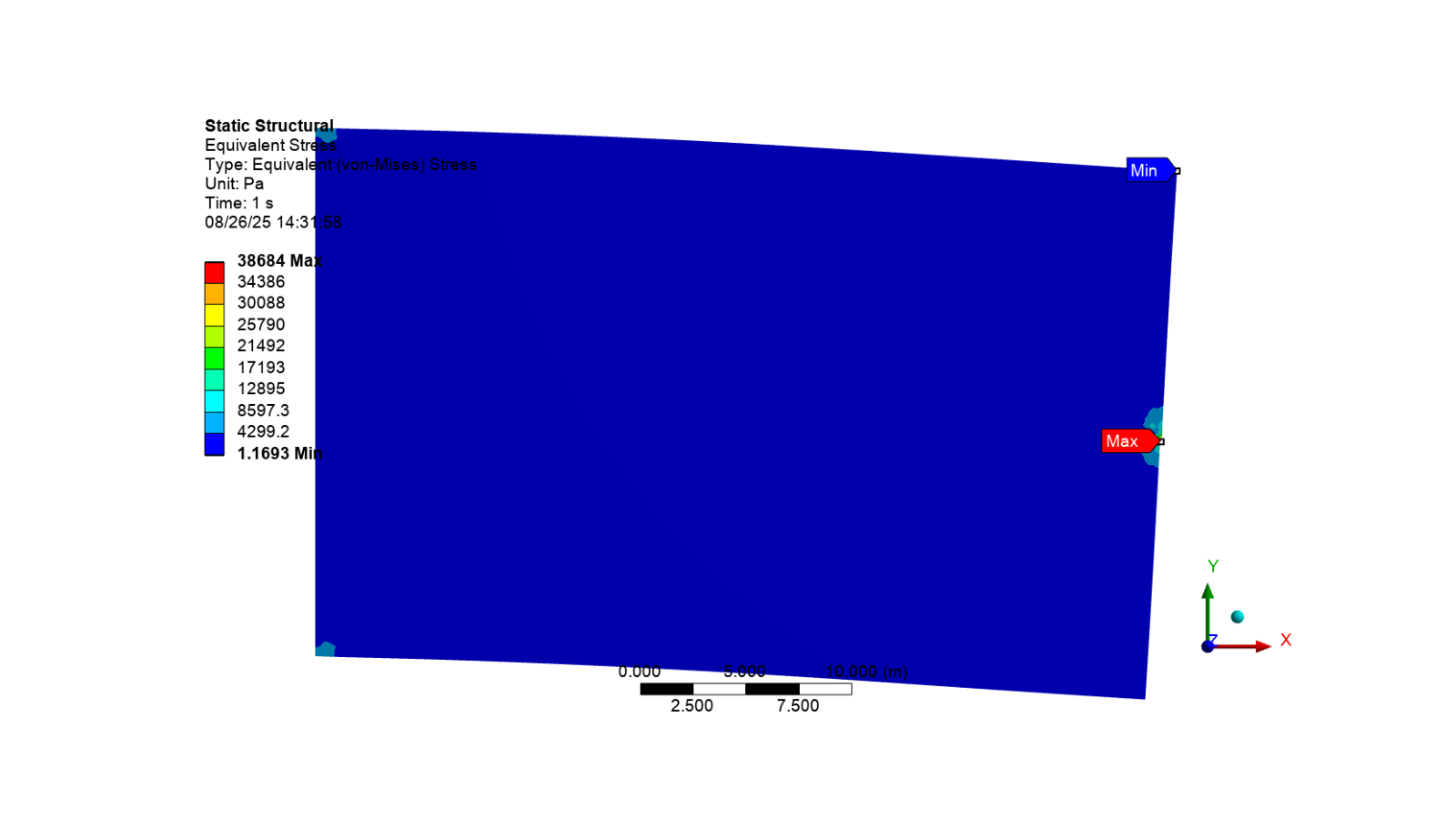
Activate the equivalent stress result and display the image
struct_sln.Children[2].Activate()
image_path = output_path / "equivalent_stress.png"
camera.SetFit()
app.helpers.export_image(struct_sln.Children[2], image_path)
app.helpers.display_image(image_path)
Topology optimization#
# Set the MKS unit system
app.ExtAPI.Application.ActiveUnitSystem = MechanicalUnitSystem.StandardMKS

# Add the topology optimization analysis to the model and transfer data from the
# structural analysis
topology_optimization = model.AddTopologyOptimizationAnalysis()
topology_optimization.TransferDataFrom(struct)

# Get the optimization region from the data model
optimization_region = DataModel.GetObjectsByType(DataModelObjectCategory.OptimizationRegion)[0]
# Set the optimization region's boundary condition to all loads and supports
optimization_region.BoundaryCondition = BoundaryConditionType.AllLoadsAndSupports
# Set the optimization region's optimization type to topology density
optimization_region.OptimizationType = OptimizationType.TopologyDensity


# Delete the mass response constraint from the topology optimization
mass_constraint = topology_optimization.Children[3]
app.DataModel.Remove(mass_constraint)

# Add a volume response constraint to the topology optimization
volume_constraint = topology_optimization.AddVolumeConstraint()

# Add a member size manufacturing constraint to the topology optimization
mem_size_manufacturing_constraint = topology_optimization.AddMemberSizeManufacturingConstraint()
# Set the constraint's minimum to manual and its minimum size to 2.4m
mem_size_manufacturing_constraint.Minimum = ManuMemberSizeControlledType.Manual
mem_size_manufacturing_constraint.MinSize = Quantity("2.4 [m]")

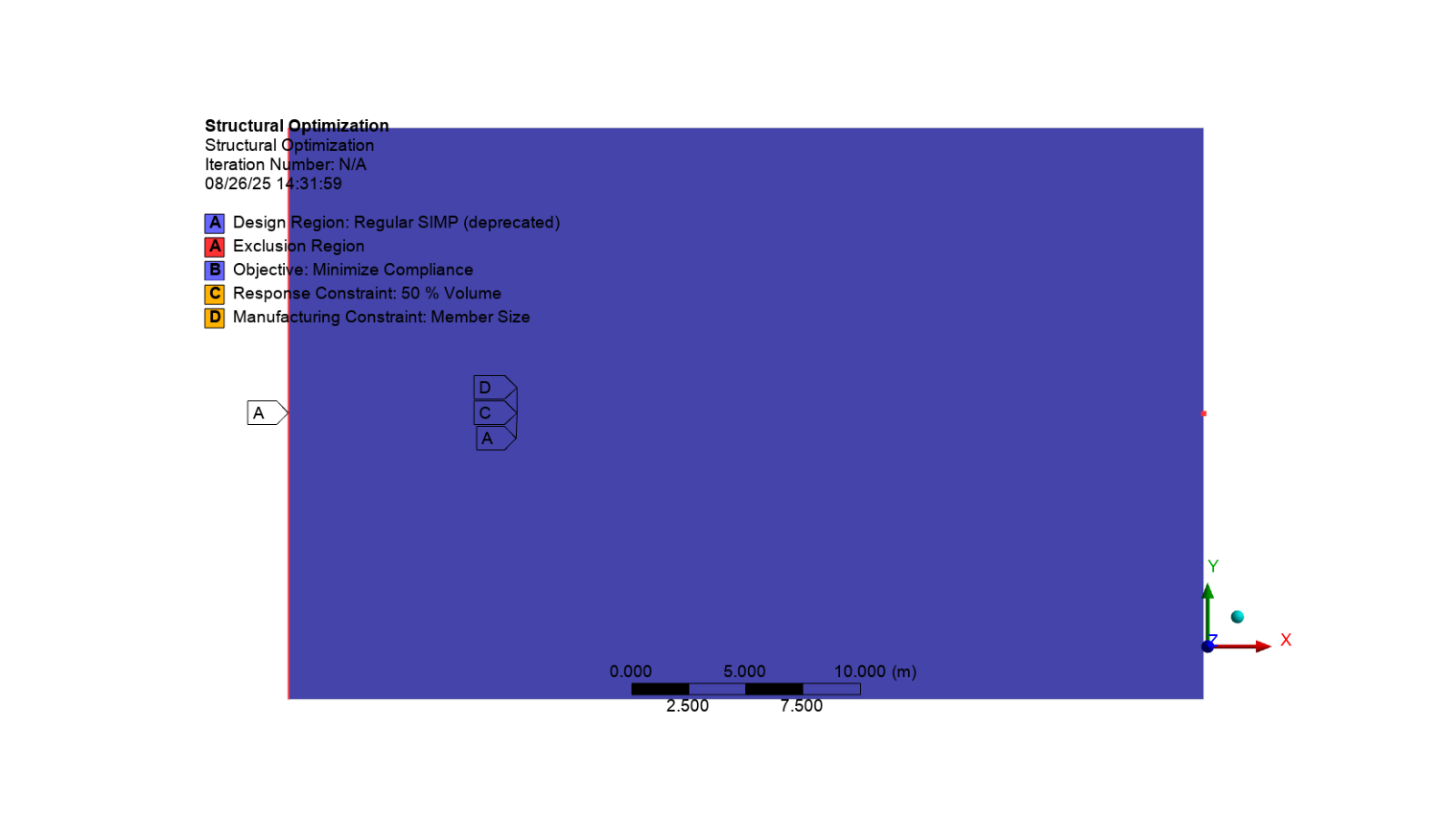
# Activate the topology optimization analysis and display the image
topology_optimization.Activate()
camera.SetFit()
app.helpers.export_image(topology_optimization, output_path / "boundary_conditions.png")
app.helpers.display_image(output_path / "boundary_conditions.png")
Solve the solution#
# Get the topology optimization analysis solution
top_opt_sln = topology_optimization.Solution
# Solve the solution
top_opt_sln.Solve(True)
Show messages#
# Print all messages from Mechanical
app.messages.show()
Severity: Info
DisplayString: For geometric constraint (Mass, Volume, Center of Gravity or Moment of Inertia constraints), it is recommended to use Criterion of the upstream Measure folder (inserted from Model object).
Severity: Info
DisplayString: The requested license was received from the License Manager after 51 seconds.
Severity: Warning
DisplayString: The default mesh size calculations have changed in 18.2. Specifically, the default min size values and/or defeature size values scale dynamically in relation to the element (max face) size. These settings could lead to a significantly different mesh, so the model will be resumed using the previous values for min size and defeature size rather than leaving those values as default.
Display the results#
# Get the topology density result and activate it
top_opt_sln.Children[1].Activate()
topology_density = top_opt_sln.Children[1]
Add smoothing to the stereolithography (STL)
# Add smoothing to the topology density result
topology_density.AddSmoothing()

# Evaluate all results for the topology optimization solution
topology_optimization.Solution.EvaluateAllResults()

# Activate the topology density result after smoothing and display the image
topology_density.Children[0].Activate()
image_path = output_path / "topo_optimized_smooth.png"
camera.SetFit()
app.helpers.export_image(topology_density.Children[0], image_path)
app.helpers.display_image(image_path)
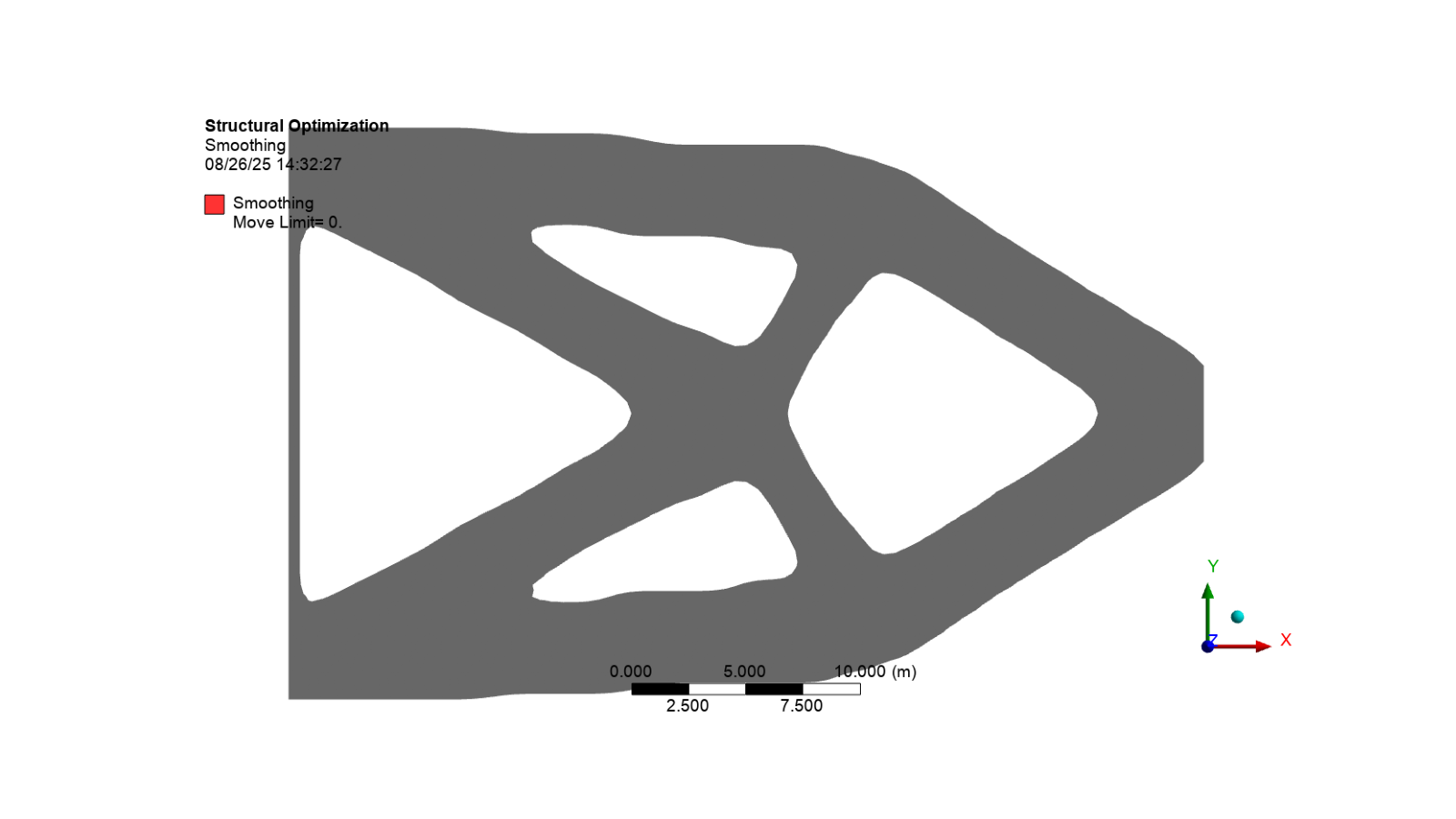
Export the animation
topology_optimized_gif = output_path / "topology_optimized.gif"
app.helpers.export_animation(topology_density, topology_optimized_gif)
Display the topology optimized animation
# Open the GIF file and create an animation
gif = Image.open(topology_optimized_gif)
fig, ax = plt.subplots(figsize=(8, 4))
ax.axis("off")
image = ax.imshow(gif.convert("RGBA"))


# Animation update function
def update_frame(frame):
    """Update the frame for the animation."""
    gif.seek(frame)
    image.set_array(gif.convert("RGBA"))
    return (image,)


# Create and display animation
ani = animation.FuncAnimation(
    fig, update_frame, frames=gif.n_frames, interval=200, blit=True, repeat=True
)

# Show the animation
plt.show()
Review the results
# Print the topology density results
print("Topology Density Results")
print("Minimum Density: ", topology_density.Minimum)
print("Maximum Density: ", topology_density.Maximum)
print("Iteration Number: ", topology_density.IterationNumber)
print("Original Volume: ", topology_density.OriginalVolume.Value)
print("Final Volume: ", topology_density.FinalVolume.Value)
print("Percent Volume of Original: ", topology_density.PercentVolumeOfOriginal)
print("Original Mass: ", topology_density.OriginalMass.Value)
print("Final Mass: ", topology_density.FinalMass.Value)
print("Percent Mass of Original: ", topology_density.PercentMassOfOriginal)
Topology Density Results
Minimum Density:  0.0010000000474974513
Maximum Density:  1.0
Iteration Number:  35
Original Volume:  1000.0000054389238
Final Volume:  522.4924773573875
Percent Volume of Original:  52.24924745155908
Original Mass:  7849999.975463867
Final Mass:  4101565.9057617188
Percent Mass of Original:  52.24924737046705
Display the project tree#
app.print_tree()
├── Project
|  ├── Model
|  |  ├── Geometry Imports (✓)
|  |  |  ├── Geometry Import (✓)
|  |  ├── Geometry (✓)
|  |  |  ├── Surface Body Bodies
|  |  |  |  ├── Surface Body
|  |  ├── Materials (✓)
|  |  |  ├── Structural Steel (✓)
|  |  ├── Coordinate Systems (✓)
|  |  |  ├── Global Coordinate System (✓)
|  |  |  ├── Coordinate System (✓)
|  |  |  ├── Coordinate System 2 (✓)
|  |  |  ├── Coordinate System 3 (✓)
|  |  |  ├── Coordinate System 4 (✓)
|  |  |  ├── Coordinate System 5 (✓)
|  |  |  ├── Coordinate System 6 (✓)
|  |  |  ├── Coordinate System 7 (✓)
|  |  |  ├── Coordinate System 8 (✓)
|  |  ├── Remote Points (✓)
|  |  ├── Mesh (✓)
|  |  |  ├── Face Sizing (✓)
|  |  ├── Named Selections
|  |  |  ├── Selection (✓)
|  |  |  ├── Bottom_Elements (✓)
|  |  |  ├── Top_Elements (✓)
|  |  |  ├── Middle1_Elements (✓)
|  |  |  ├── Middle2_Elements (✓)
|  |  |  ├── Left1_Elements (✓)
|  |  |  ├── Left2_Elements (✓)
|  |  |  ├── Right1_Elements (✓)
|  |  |  ├── Right2_Elements (✓)
|  |  |  ├── Optimized_Shape (✓)
|  |  |  ├── Outside_Optimized_Shape (✓)
|  |  |  ├── Selection 2 (✓)
|  |  |  ├── Selection 3 (✓)
|  |  |  ├── Selection 4 (✓)
|  |  |  ├── Selection 5 (✓)
|  |  ├── Static Structural (✓)
|  |  |  ├── Analysis Settings (✓)
|  |  |  ├── Fixed Support (✓)
|  |  |  ├── Nodal Force (✓)
|  |  |  ├── Solution (✓)
|  |  |  |  ├── Solution Information (✓)
|  |  |  |  ├── Total Deformation (✓)
|  |  |  |  ├── Equivalent Stress (✓)
|  |  ├── Structural Optimization (✓)
|  |  |  ├── Analysis Settings (✓)
|  |  |  ├── Optimization Region (✓)
|  |  |  ├── Objective (✓)
|  |  |  ├── Response Constraint (✓)
|  |  |  ├── Manufacturing Constraint (✓)
|  |  |  ├── Solution (✓)
|  |  |  |  ├── Solution Information (✓)
|  |  |  |  |  ├── Topology Density Tracker (✓)
|  |  |  |  ├── Topology Density (✓)
|  |  |  |  |  ├── Smoothing (✓)
Clean up the project#
# Save the project file
mechdat_file = output_path / "cantilever_beam_topology_optimization.mechdat"
app.save_as(str(mechdat_file), overwrite=True)

# Close the app
app.close()

# Delete the example files
delete_downloads()
True
Total running time of the script: (0 minutes 36.282 seconds)