

Note
Go to the end to download the full example code.
Basic valve implementation#
This example demonstrates a basic implementation of a valve in Python.
Import the necessary libraries#
from pathlib import Path
from typing import TYPE_CHECKING

from matplotlib import pyplot as plt
from matplotlib.animation import FuncAnimation
from PIL import Image

from ansys.mechanical.core import App
from ansys.mechanical.core.examples import delete_downloads, download_file

if TYPE_CHECKING:
    import Ansys
Initialize the embedded application#
app = App(globals=globals())
print(app)

# Set the path for the output files (images, gifs, mechdat)
output_path = Path.cwd() / "out"

# Set camera and graphics

graphics = app.Graphics
camera = graphics.Camera
Ansys Mechanical [Ansys Mechanical Enterprise]
Product Version:261
Software build date: 01/30/2026 18:48:37
Download and import the geometry file#
# Download the geometry file
geometry_path = download_file("Valve.pmdb", "pymechanical", "embedding")
Import the geometry#
# Define the model
model = app.Model

app.helpers.import_geometry(geometry_path, process_named_selections=True)

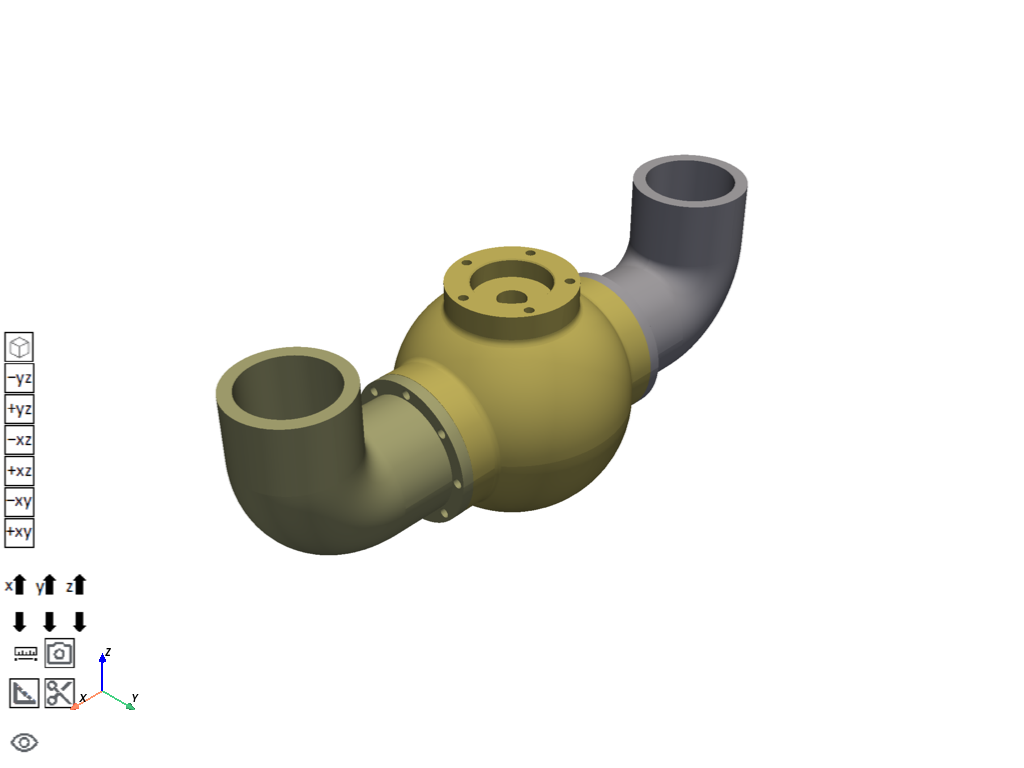
# Visualize the model in 3D
app.plot()
[]
Assign the materials and mesh the geometry#
# Add the material assignment to the model materials
material_assignment = model.Materials.AddMaterialAssignment()

# Set the material to structural steel
material_assignment.Material = "Structural Steel"

# Create selection information for the geometry entities
selection_info = app.ExtAPI.SelectionManager.CreateSelectionInfo(
    Ansys.ACT.Interfaces.Common.SelectionTypeEnum.GeometryEntities
)

# Get the geometric bodies from the model and add their IDs to the selection info IDs list
selection_info.Ids = [
    body.GetGeoBody().Id
    for body in model.Geometry.GetChildren(
        Ansys.Mechanical.DataModel.Enums.DataModelObjectCategory.Body, True
    )
]
# Set the material assignment location to the selected geometry entities
material_assignment.Location = selection_info
Define the mesh settings and generate the mesh#
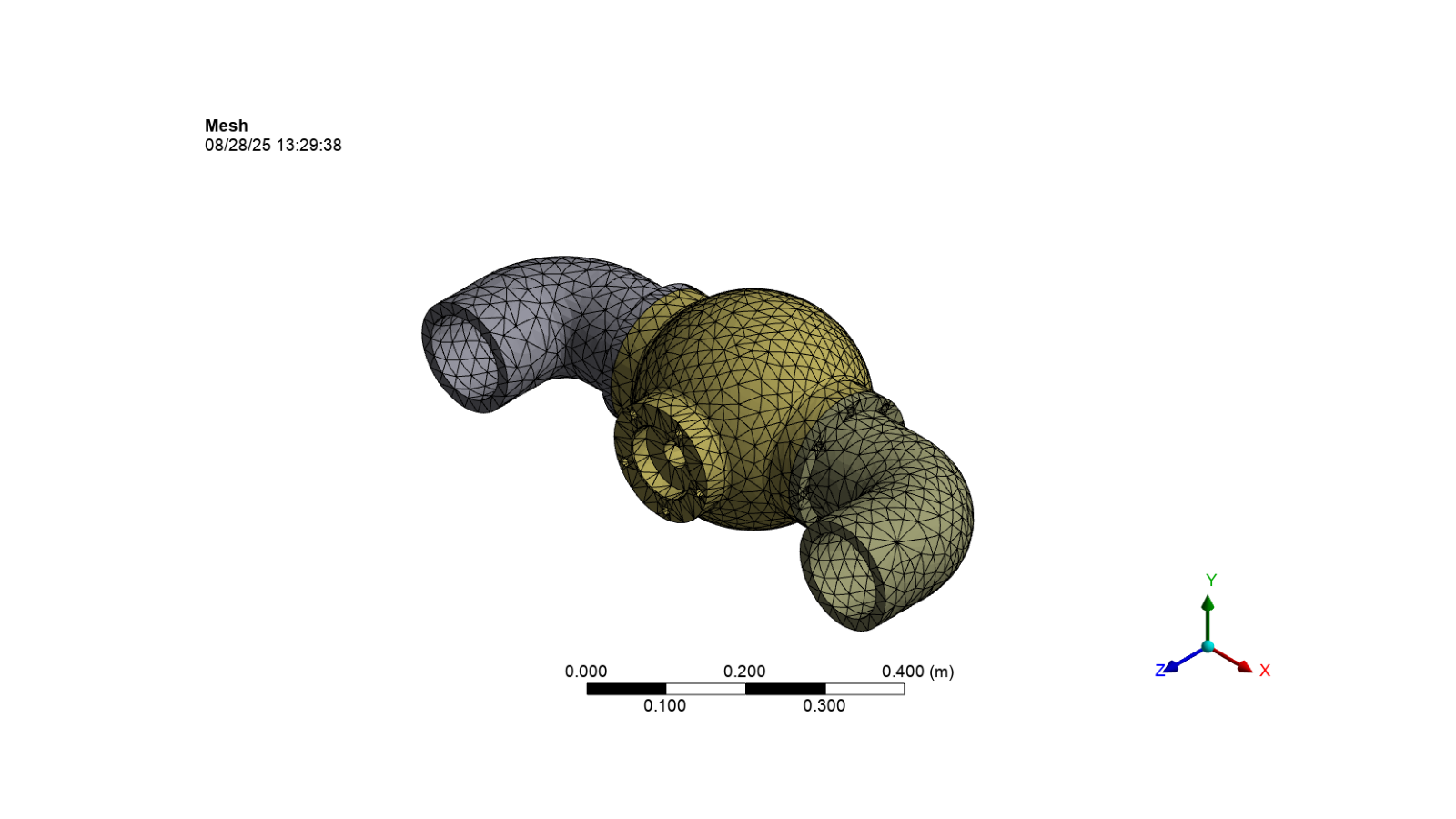
# Define the mesh
mesh = model.Mesh
# Set the mesh element size to 25mm
mesh.ElementSize = Quantity(25, "mm")

# Generate the mesh
mesh.GenerateMesh()

# Activate the mesh and display the image
image_path = output_path / "mesh.png"
camera.SetFit()
app.helpers.export_image(mesh, image_path)
app.helpers.display_image(image_path)
Add a static structural analysis and apply boundary conditions#
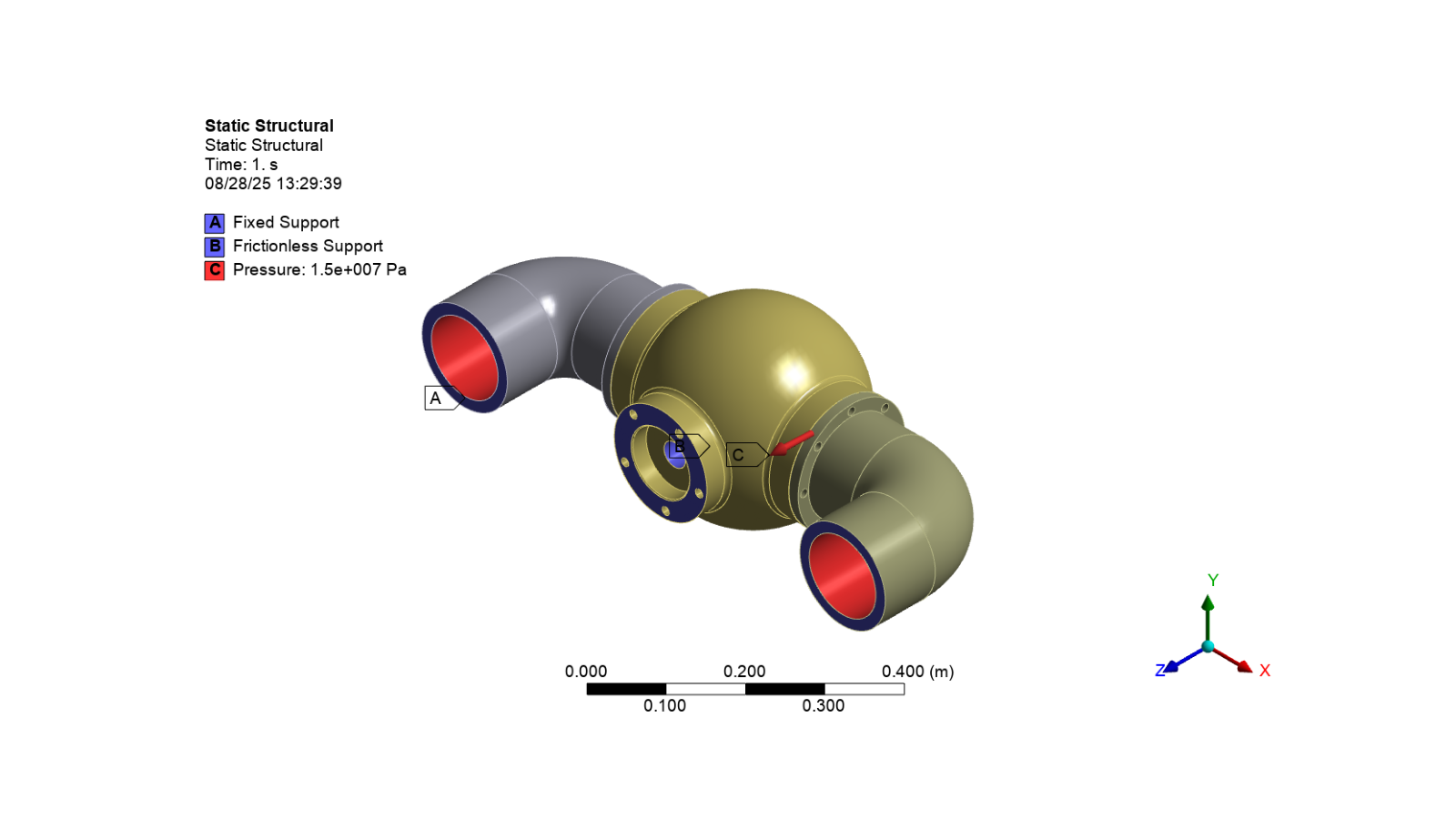
# Add a static structural analysis to the model
analysis = model.AddStaticStructuralAnalysis()

# Add a fixed support to the analysis
fixed_support = analysis.AddFixedSupport()
# Set the fixed support location to the "NSFixedSupportFaces" object
fixed_support.Location = app.ExtAPI.DataModel.GetObjectsByName("NSFixedSupportFaces")[0]

# Add a frictionless support to the analysis
frictionless_support = analysis.AddFrictionlessSupport()
# Set the frictionless support location to the "NSFrictionlessSupportFaces" object
frictionless_support.Location = app.ExtAPI.DataModel.GetObjectsByName("NSFrictionlessSupportFaces")[
    0
]

# Add pressure to the analysis
pressure = analysis.AddPressure()
# Set the pressure location to the "NSInsideFaces" object
pressure.Location = app.ExtAPI.DataModel.GetObjectsByName("NSInsideFaces")[0]

# Set the pressure magnitude's input and output values
pressure.Magnitude.Inputs[0].DiscreteValues = [Quantity("0 [s]"), Quantity("1 [s]")]
pressure.Magnitude.Output.DiscreteValues = [Quantity("0 [Pa]"), Quantity("15 [MPa]")]

# Activate the analysis and display the image
image_path = output_path / "boundary_conditions.png"
camera.SetFit()
app.helpers.export_image(analysis, image_path)
app.helpers.display_image(image_path)
Add results to the analysis solution#
# Define the solution for the analysis
solution = analysis.Solution

# Add the total deformation and equivalent stress results to the solution
deformation = solution.AddTotalDeformation()
stress = solution.AddEquivalentStress()
Solve the solution#
solution.Solve(True)
Show messages#
# Print all messages from Mechanical
app.messages.show()
Severity: Info
DisplayString: The requested license was received from the License Manager after 29 seconds.
Display the results#
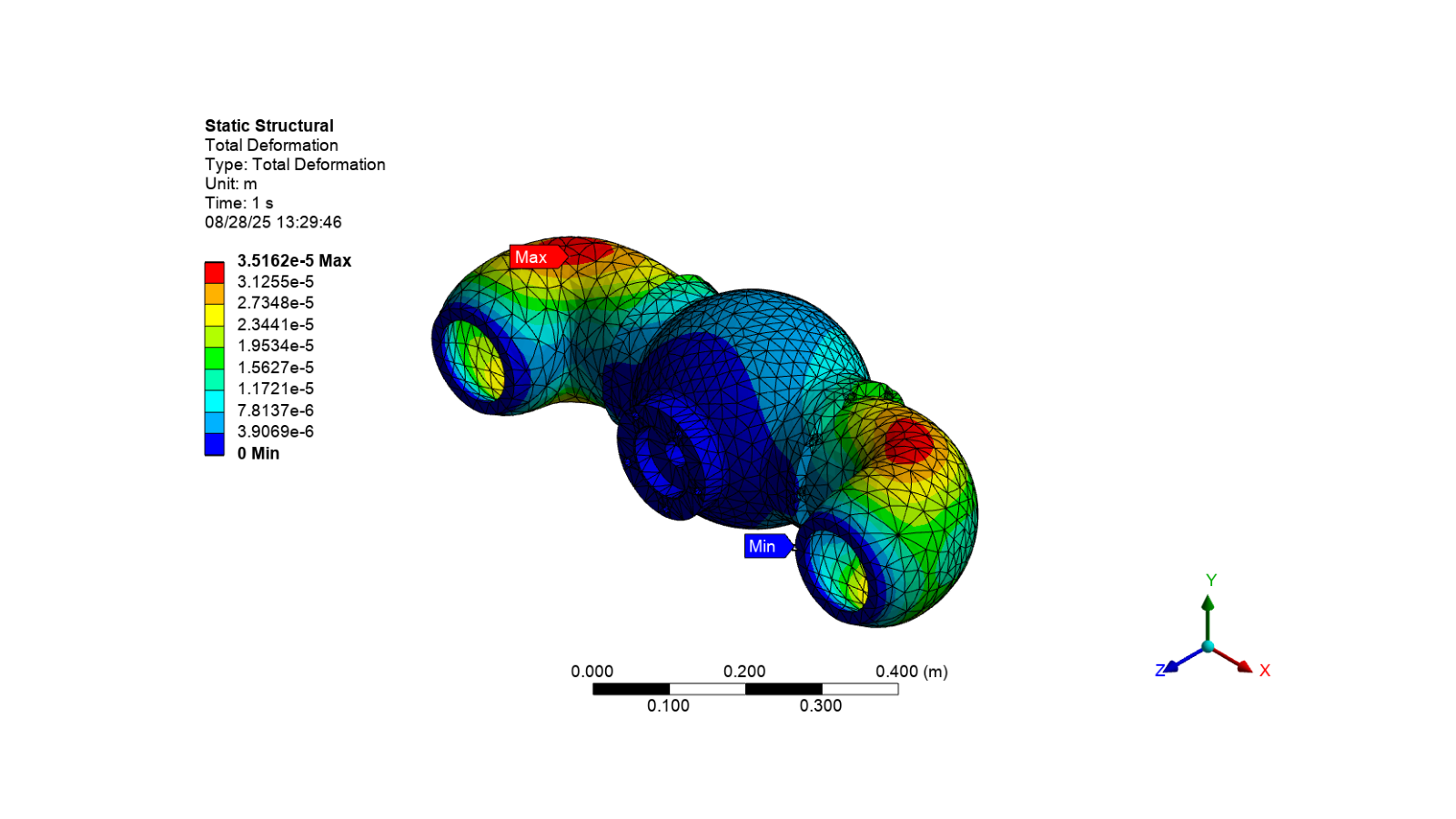
Show the total deformation image#
# Activate the total deformation result and display the image
app.Tree.Activate([deformation])
image_path = output_path / "total_deformation_valve.png"
camera.SetFit()
app.helpers.export_image(deformation, image_path)
app.helpers.display_image(image_path)
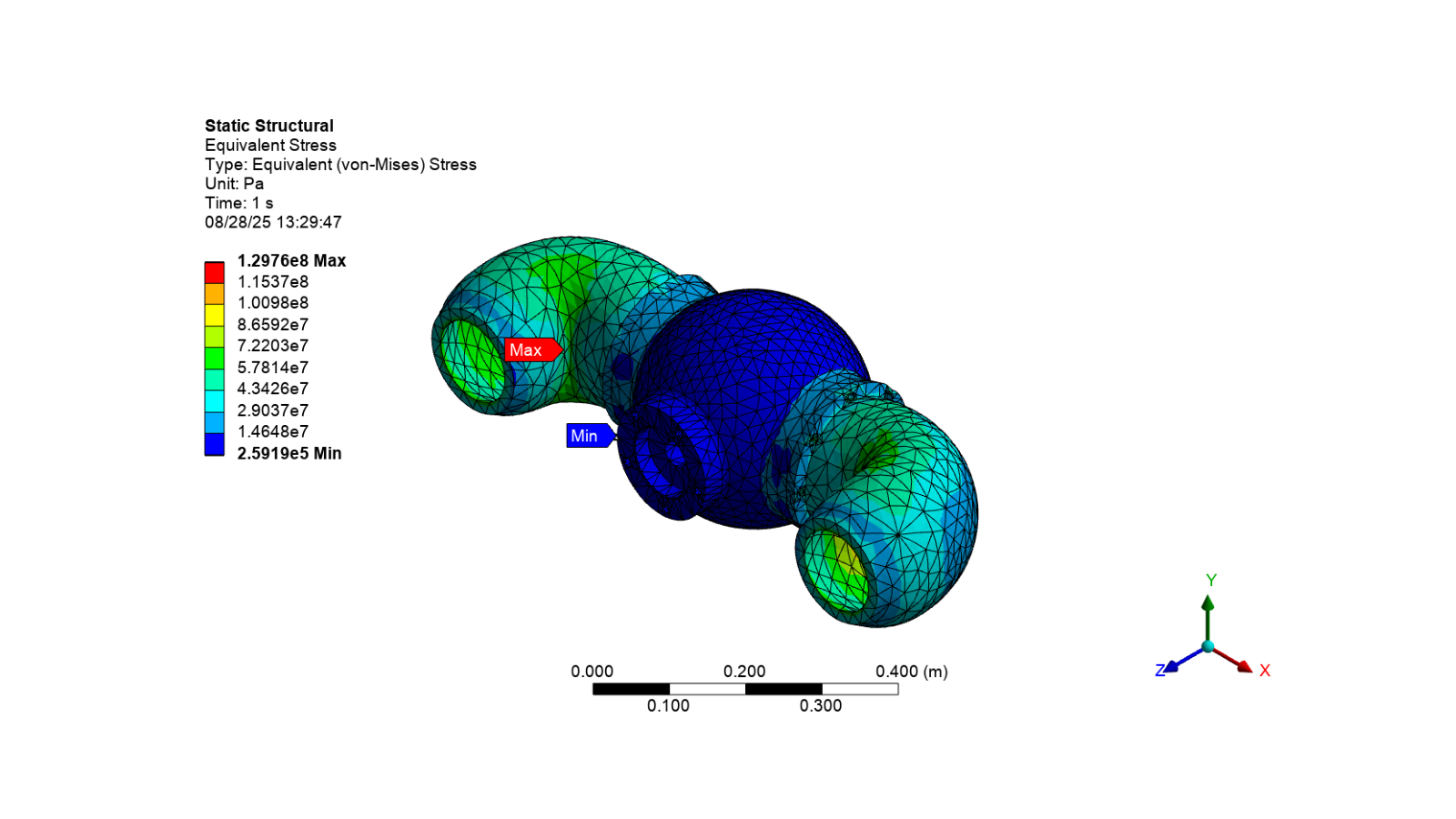
Show the equivalent stress image#
# Activate the equivalent stress result and display the image
app.Tree.Activate([stress])
image_path = output_path / "stress_valve.png"
camera.SetFit()
app.helpers.export_image(stress, image_path)
app.helpers.display_image(image_path)
Export the stress animation#
camera.SetFit()
valve_gif = output_path / "valve.gif"
app.helpers.export_animation(stress, valve_gif)
Display the stress animation#
# Open the GIF file and create an animation
gif = Image.open(valve_gif)
fig, ax = plt.subplots(figsize=(8, 4))
ax.axis("off")
image = ax.imshow(gif.convert("RGBA"))


# Animation update function
def update_frame(frame):
    """Update the frame for the animation."""
    gif.seek(frame)
    image.set_array(gif.convert("RGBA"))
    return (image,)


# Create and display animation
ani = FuncAnimation(fig, update_frame, frames=gif.n_frames, interval=200, blit=True, repeat=True)

# Show the animation
plt.show()
Display the output file from the solve#
# Get the path to the solve output file
solve_path = Path(analysis.WorkingDir)
# Get the solve output file path
solve_out_path = solve_path / "solve.out"
# If the solve output file exists, print its contents
if solve_out_path:
    with solve_out_path.open("rt") as file:
        for line in file:
            print(line, end="")
Ansys Mechanical Enterprise
*------------------------------------------------------------------*
| |
| W E L C O M E T O T H E A N S Y S (R) P R O G R A M |
| |
*------------------------------------------------------------------*
***************************************************************
* ANSYS MAPDL 2026 R1 LEGAL NOTICES *
***************************************************************
* *
* Copyright (c) 2026 Synopsys, Inc. and ANSYS, Inc. *
* All rights reserved. *
* Unauthorized use, distribution or duplication is *
* prohibited. *
* *
* Ansys is a registered trademark of Ansys, Inc. or its *
* subsidiaries in the United States or other countries. *
* See the Ansys, Inc. online documentation or the Ansys, Inc. *
* documentation CD or online help for the complete Legal *
* Notice. *
* *
***************************************************************
* *
* THIS ANSYS SOFTWARE PRODUCT AND PROGRAM DOCUMENTATION *
* INCLUDE TRADE SECRETS AND CONFIDENTIAL AND PROPRIETARY *
* PRODUCTS OF ANSYS, INC., ITS SUBSIDIARIES, OR LICENSORS. *
* The software products and documentation are furnished by *
* Ansys, Inc. or its subsidiaries under a software license *
* agreement that contains provisions concerning *
* non-disclosure, copying, length and nature of use, *
* compliance with exporting laws, warranties, disclaimers, *
* limitations of liability, and remedies, and other *
* provisions. The software products and documentation may be *
* used, disclosed, transferred, or copied only in accordance *
* with the terms and conditions of that software license *
* agreement. *
* *
* Ansys, Inc. is a UL registered *
* ISO 9001:2015 company. *
* *
***************************************************************
* *
* This product is subject to U.S. laws governing export and *
* re-export. *
* *
* For U.S. Government users, except as specifically granted *
* by the Ansys, Inc. software license agreement, the use, *
* duplication, or disclosure by the United States Government *
* is subject to restrictions stated in the Ansys, Inc. *
* software license agreement and FAR 12.212 (for non-DOD *
* licenses). *
* *
***************************************************************
2026 R1
Point Releases and Patches installed:
Ansys, Inc. License Manager 2026 R1
LS-DYNA 2026 R1
Core WB Files 2026 R1
Mechanical Products 2026 R1
***** MAPDL COMMAND LINE ARGUMENTS *****
BATCH MODE REQUESTED (-b) = NOLIST
INPUT FILE COPY MODE (-c) = COPY
DISTRIBUTED MEMORY PARALLEL REQUESTED
4 PARALLEL PROCESSES REQUESTED WITH SINGLE THREAD PER PROCESS
TOTAL OF 4 CORES REQUESTED
INPUT FILE NAME = /github/home/.mw/Application Data/Ansys/v261/AnsysMechA9B5/Project_Mech_Files/StaticStructural/dummy.dat
OUTPUT FILE NAME = /github/home/.mw/Application Data/Ansys/v261/AnsysMechA9B5/Project_Mech_Files/StaticStructural/solve.out
START-UP FILE MODE = NOREAD
STOP FILE MODE = NOREAD
RELEASE= 2026 R1 BUILD= 26.1 UP20260202 VERSION=LINUX x64
CURRENT JOBNAME=file0 21:08:27 SEP 07, 2026 Elapsed Time= 0.234
PARAMETER _DS_PROGRESS = 999.0000000
/INPUT FILE= ds.dat LINE= 0
*** NOTE *** ELAPSED TIME = 0.625 TIME= 21:08:27
The /CONFIG,NOELDB command is not valid in a distributed memory
parallel solution. Command is ignored.
*GET _WALLSTRT FROM ACTI ITEM=TIME WALL VALUE= 0.174360012E-03
TITLE=
--Static Structural
SET PARAMETER DIMENSIONS ON _WB_PROJECTSCRATCH_DIR
TYPE=STRI DIMENSIONS= 248 1 1
PARAMETER _WB_PROJECTSCRATCH_DIR(1) = /github/home/.mw/Application Data/Ansys/v261/AnsysMechA9B5/Project_Mech_Files/StaticStructural/
SET PARAMETER DIMENSIONS ON _WB_SOLVERFILES_DIR
TYPE=STRI DIMENSIONS= 248 1 1
PARAMETER _WB_SOLVERFILES_DIR(1) = /github/home/.mw/Application Data/Ansys/v261/AnsysMechA9B5/Project_Mech_Files/StaticStructural/
SET PARAMETER DIMENSIONS ON _WB_USERFILES_DIR
TYPE=STRI DIMENSIONS= 248 1 1
PARAMETER _WB_USERFILES_DIR(1) = /github/home/.mw/Application Data/Ansys/v261/AnsysMechA9B5/Project_Mech_Files/UserFiles/
--- Data in consistent MKS units. See Solving Units in the help system for more
MKS UNITS SPECIFIED FOR INTERNAL
LENGTH (l) = METER (M)
MASS (M) = KILOGRAM (KG)
TIME (t) = SECOND (SEC)
TEMPERATURE (T) = CELSIUS (C)
TOFFSET = 273.0
CHARGE (Q) = COULOMB
FORCE (f) = NEWTON (N) (KG-M/SEC2)
HEAT = JOULE (N-M)
PRESSURE = PASCAL (NEWTON/M**2)
ENERGY (W) = JOULE (N-M)
POWER (P) = WATT (N-M/SEC)
CURRENT (i) = AMPERE (COULOMBS/SEC)
CAPACITANCE (C) = FARAD
INDUCTANCE (L) = HENRY
MAGNETIC FLUX = WEBER
RESISTANCE (R) = OHM
ELECTRIC POTENTIAL = VOLT
INPUT UNITS ARE ALSO SET TO MKS
*** MAPDL - ENGINEERING ANALYSIS SYSTEM RELEASE 2026 R1 26.1 ***
Ansys Mechanical Enterprise
00000000 VERSION=LINUX x64 21:08:27 SEP 07, 2026 Elapsed Time= 0.629
--Static Structural
***** MAPDL ANALYSIS DEFINITION (PREP7) *****
*********** Send User Defined Coordinate System(s) ***********
*********** Nodes for the whole assembly ***********
*********** Elements for Body 1 'Connector\Solid1' ***********
*********** Elements for Body 2 'Right_elbow\Solid1' ***********
*********** Elements for Body 3 'Left_elbow\Solid1' ***********
*********** Set Reference Temperature ***********
*********** Send Materials ***********
*********** Create Contact "Contact Region" ***********
Real Constant Set For Above Contact Is 5 & 4
*********** Create Contact "Contact Region 2" ***********
Real Constant Set For Above Contact Is 7 & 6
*********** Send Named Selection as Node Component ***********
*********** Send Named Selection as Node Component ***********
*********** Send Named Selection as Node Component ***********
*********** Fixed Supports ***********
********* Frictionless Supports X *********
********* Frictionless Supports Z *********
*********** Node Rotations ***********
*********** Define Pressure Using Surface Effect Elements "Pressure" **********
***** ROUTINE COMPLETED ***** ELAPSED TIME = 0.724
--- Number of total nodes = 27269
--- Number of contact elements = 3294
--- Number of spring elements = 0
--- Number of bearing elements = 0
--- Number of solid elements = 14716
--- Number of condensed parts = 0
--- Number of total elements = 18010
*GET _WALLBSOL FROM ACTI ITEM=TIME WALL VALUE= 0.201441930E-03
****************************************************************************
************************* SOLUTION ********************************
****************************************************************************
***** MAPDL SOLUTION ROUTINE *****
PERFORM A STATIC ANALYSIS
THIS WILL BE A NEW ANALYSIS
PARAMETER _THICKRATIO = 0.3330000000
USE SPARSE MATRIX DIRECT SOLVER
CONTACT INFORMATION PRINTOUT LEVEL 1
CHECK INITIAL OPEN/CLOSED STATUS OF SELECTED CONTACT ELEMENTS
AND LIST DETAILED CONTACT PAIR INFORMATION
SPLIT CONTACT SURFACES AT SOLVE PHASE
NUMBER OF SPLITTING TBD BY PROGRAM
DO NOT COMBINE ELEMENT MATRIX FILES (.emat) AFTER DISTRIBUTED PARALLEL SOLUTION
DO NOT COMBINE ELEMENT SAVE DATA FILES (.esav) AFTER DISTRIBUTED PARALLEL SOLUTION
NLDIAG: Nonlinear diagnostics CONT option is set to ON.
Writing frequency : each ITERATION.
DO NOT SAVE ANY RESTART FILES AT ALL
****************************************************
******************* SOLVE FOR LS 1 OF 1 ****************
SELECT FOR ITEM=TYPE COMPONENT=
IN RANGE 8 TO 8 STEP 1
1694 ELEMENTS (OF 18010 DEFINED) SELECTED BY ESEL COMMAND.
SELECT ALL NODES HAVING ANY ELEMENT IN ELEMENT SET.
3556 NODES (OF 27269 DEFINED) SELECTED FROM
1694 SELECTED ELEMENTS BY NSLE COMMAND.
GENERATE SURFACE LOAD PRES ON SURFACE DEFINED BY ALL SELECTED NODES
SET ACCORDING TO TABLE PARAMETER = _LOADVARI56
NUMBER OF PRES ELEMENT FACE LOADS STORED = 1694
ALL SELECT FOR ITEM=NODE COMPONENT=
IN RANGE 1 TO 27269 STEP 1
27269 NODES (OF 27269 DEFINED) SELECTED BY NSEL COMMAND.
ALL SELECT FOR ITEM=ELEM COMPONENT=
IN RANGE 1 TO 25358 STEP 1
18010 ELEMENTS (OF 18010 DEFINED) SELECTED BY ESEL COMMAND.
ALL SELECT FOR ITEM=ELEM COMPONENT=
IN RANGE 1 TO 25358 STEP 1
18010 ELEMENTS (OF 18010 DEFINED) SELECTED BY ESEL COMMAND.
PRINTOUT RESUMED BY /GOP
USE 1 SUBSTEPS INITIALLY THIS LOAD STEP FOR ALL DEGREES OF FREEDOM
FOR AUTOMATIC TIME STEPPING:
USE 1 SUBSTEPS AS A MAXIMUM
USE 1 SUBSTEPS AS A MINIMUM
TIME= 1.0000
ERASE THE CURRENT DATABASE OUTPUT CONTROL TABLE.
WRITE ALL ITEMS TO THE DATABASE WITH A FREQUENCY OF NONE
FOR ALL APPLICABLE ENTITIES
WRITE NSOL ITEMS TO THE DATABASE WITH A FREQUENCY OF ALL
FOR ALL APPLICABLE ENTITIES
WRITE RSOL ITEMS TO THE DATABASE WITH A FREQUENCY OF ALL
FOR ALL APPLICABLE ENTITIES
WRITE EANG ITEMS TO THE DATABASE WITH A FREQUENCY OF ALL
FOR ALL APPLICABLE ENTITIES
WRITE ETMP ITEMS TO THE DATABASE WITH A FREQUENCY OF ALL
FOR ALL APPLICABLE ENTITIES
WRITE VENG ITEMS TO THE DATABASE WITH A FREQUENCY OF ALL
FOR ALL APPLICABLE ENTITIES
WRITE STRS ITEMS TO THE DATABASE WITH A FREQUENCY OF ALL
FOR ALL APPLICABLE ENTITIES
WRITE EPEL ITEMS TO THE DATABASE WITH A FREQUENCY OF ALL
FOR ALL APPLICABLE ENTITIES
WRITE EPPL ITEMS TO THE DATABASE WITH A FREQUENCY OF ALL
FOR ALL APPLICABLE ENTITIES
WRITE CONT ITEMS TO THE DATABASE WITH A FREQUENCY OF ALL
FOR ALL APPLICABLE ENTITIES
*GET ANSINTER_ FROM ACTI ITEM=INT VALUE= 0.00000000
*IF ANSINTER_ ( = 0.00000 ) NE
0 ( = 0.00000 ) THEN
*ENDIF
*** NOTE *** ELAPSED TIME = 0.777 TIME= 21:08:27
The automatic domain decomposition logic has selected the MESH domain
decomposition method with 4 processes per solution.
***** MAPDL SOLVE COMMAND *****
*** WARNING *** ELAPSED TIME = 0.794 TIME= 21:08:27
Element shape checking is currently inactive. Issue SHPP,ON or
SHPP,WARN to reactivate, if desired.
*** NOTE *** ELAPSED TIME = 0.809 TIME= 21:08:27
The model data was checked and warning messages were found.
Please review output or errors file ( /github/home/.mw/Application
Data/Ansys/v261/AnsysMechA9B5/Project_Mech_Files/StaticStructural/file0
0.err ) for these warning messages.
*** SELECTION OF ELEMENT TECHNOLOGIES FOR APPLICABLE ELEMENTS ***
--- GIVE SUGGESTIONS AND RESET THE KEY OPTIONS ---
ELEMENT TYPE 1 IS SOLID187. IT IS NOT ASSOCIATED WITH FULLY INCOMPRESSIBLE
HYPERELASTIC MATERIALS. NO SUGGESTION IS AVAILABLE AND NO RESETTING IS NEEDED.
ELEMENT TYPE 2 IS SOLID187. IT IS NOT ASSOCIATED WITH FULLY INCOMPRESSIBLE
HYPERELASTIC MATERIALS. NO SUGGESTION IS AVAILABLE AND NO RESETTING IS NEEDED.
ELEMENT TYPE 3 IS SOLID187. IT IS NOT ASSOCIATED WITH FULLY INCOMPRESSIBLE
HYPERELASTIC MATERIALS. NO SUGGESTION IS AVAILABLE AND NO RESETTING IS NEEDED.
*** MAPDL - ENGINEERING ANALYSIS SYSTEM RELEASE 2026 R1 26.1 ***
Ansys Mechanical Enterprise
00000000 VERSION=LINUX x64 21:08:27 SEP 07, 2026 Elapsed Time= 0.814
--Static Structural
S O L U T I O N O P T I O N S
PROBLEM DIMENSIONALITY. . . . . . . . . . . . .3-D
DEGREES OF FREEDOM. . . . . . UX UY UZ
ANALYSIS TYPE . . . . . . . . . . . . . . . . .STATIC (STEADY-STATE)
OFFSET TEMPERATURE FROM ABSOLUTE ZERO . . . . . 273.15
EQUATION SOLVER OPTION. . . . . . . . . . . . .SPARSE
GLOBALLY ASSEMBLED MATRIX . . . . . . . . . . .SYMMETRIC
*** WARNING *** ELAPSED TIME = 0.829 TIME= 21:08:27
Material number 8 (used by element 23665) should normally have at least
one MP or one TB type command associated with it. Output of energy by
material may not be available.
*** NOTE *** ELAPSED TIME = 0.837 TIME= 21:08:27
The step data was checked and warning messages were found.
Please review output or errors file ( /github/home/.mw/Application
Data/Ansys/v261/AnsysMechA9B5/Project_Mech_Files/StaticStructural/file0
0.err ) for these warning messages.
*** NOTE *** ELAPSED TIME = 0.837 TIME= 21:08:27
The conditions for direct assembly have been met. No .emat or .erot
files will be produced.
TRIM CONTACT/TARGET SURFACE
START TRIMMING SMALL/BONDED CONTACT PAIRS FOR DMP RUN.
400 CONTACT ELEMENTS & 400 TARGET ELEMENTS ARE DELETED DUE TO TRIMMING LOGIC.
2 CONTACT PAIRS ARE REMOVED.
CHECK INITIAL OPEN/CLOSED STATUS OF SELECTED CONTACT ELEMENTS
AND LIST DETAILED CONTACT PAIR INFORMATION
*** NOTE *** ELAPSED TIME = 1.139 TIME= 21:08:27
The maximum number of contact elements in any single contact pair is
200, which is smaller than the optimal domain size of 944 elements for
the given number of CPU domains (4). Therefore, no contact pairs are
being split by the CNCH,DMP logic.
*** NOTE *** ELAPSED TIME = 1.250 TIME= 21:08:27
Deformable-deformable contact pair identified by real constant set 5
and contact element type 4 has been set up.
Auto surface constraint is built
Contact algorithm: MPC based approach
*** NOTE *** ELAPSED TIME = 1.250 TIME= 21:08:27
Contact related postprocess items (ETABLE, pressure ...) are not
available.
Contact detection at: nodal point (normal to target surface)
MPC will be built internally to handle bonded contact.
Average contact surface length 0.14033E-01
Average contact pair depth 0.82322E-02
Average target surface length 0.13760E-01
Default pinball region factor PINB 0.25000
The resulting pinball region 0.20581E-02
Default target edge extension factor TOLS 2.0000
Initial penetration/gap is excluded.
Bonded contact (always) is defined.
*** NOTE *** ELAPSED TIME = 1.250 TIME= 21:08:27
Max. Initial penetration 6.245004514E-17 was detected between contact
element 22602 and target element 22125.
****************************************
*** NOTE *** ELAPSED TIME = 1.250 TIME= 21:08:27
Deformable-deformable contact pair identified by real constant set 7
and contact element type 6 has been set up.
Auto surface constraint is built
Contact algorithm: MPC based approach
*** NOTE *** ELAPSED TIME = 1.250 TIME= 21:08:27
Contact related postprocess items (ETABLE, pressure ...) are not
available.
Contact detection at: nodal point (normal to target surface)
MPC will be built internally to handle bonded contact.
Average contact surface length 0.14121E-01
Average contact pair depth 0.80890E-02
Average target surface length 0.13762E-01
Default pinball region factor PINB 0.25000
The resulting pinball region 0.20222E-02
Default target edge extension factor TOLS 2.0000
Initial penetration/gap is excluded.
Bonded contact (always) is defined.
*** NOTE *** ELAPSED TIME = 1.250 TIME= 21:08:27
Max. Initial penetration 8.066464163E-17 was detected between contact
element 23289 and target element 22911.
****************************************
D I S T R I B U T E D D O M A I N D E C O M P O S E R
...Number of elements: 17210
...Number of nodes: 27269
...Decompose to 4 CPU domains
...Element load balance ratio = 1.056
L O A D S T E P O P T I O N S
LOAD STEP NUMBER. . . . . . . . . . . . . . . . 1
TIME AT END OF THE LOAD STEP. . . . . . . . . . 1.0000
NUMBER OF SUBSTEPS. . . . . . . . . . . . . . . 1
STEP CHANGE BOUNDARY CONDITIONS . . . . . . . . NO
PRINT OUTPUT CONTROLS . . . . . . . . . . . . .NO PRINTOUT
DATABASE OUTPUT CONTROLS
ITEM FREQUENCY COMPONENT
ALL NONE
NSOL ALL
RSOL ALL
EANG ALL
ETMP ALL
VENG ALL
STRS ALL
EPEL ALL
EPPL ALL
CONT ALL
SOLUTION MONITORING INFO IS WRITTEN TO FILE= file.mntr
*********** PRECISE MASS SUMMARY ***********
TOTAL RIGID BODY MASS MATRIX ABOUT ORIGIN
Translational mass | Coupled translational/rotational mass
138.26 0.0000 0.0000 | 0.0000 -56.527 30.290
0.0000 138.26 0.0000 | 56.527 0.0000 0.74353E-02
0.0000 0.0000 138.26 | -30.290 -0.74353E-02 0.0000
------------------------------------------ | ------------------------------------------
| Rotational mass (inertia)
| 31.206 0.16272E-02 0.31321E-02
| 0.16272E-02 27.750 -12.384
| 0.31321E-02 -12.384 11.101
TOTAL MASS = 138.26
The mass principal axes coincide with the global Cartesian axes
CENTER OF MASS (X,Y,Z)= 0.53776E-04 -0.21908 -0.40884
TOTAL INERTIA ABOUT CENTER OF MASS
1.4602 -0.16530E-05 0.92265E-04
-0.16530E-05 4.6399 -0.29228E-06
0.92265E-04 -0.29228E-06 4.4654
The inertia principal axes coincide with the global Cartesian axes
*** MASS SUMMARY BY ELEMENT TYPE ***
TYPE MASS
1 100.158
2 19.0534
3 19.0533
Range of element maximum matrix coefficients in global coordinates
Maximum = 2.134166237E+10 at element 8791.
Minimum = 599857667 at element 6364.
*** ELEMENT MATRIX FORMULATION TIMES
TYPE NUMBER ENAME TOTAL ELAPSED AVG ELAPSED
1 8978 SOLID187 0.4463 0.000049709
2 2789 SOLID187 0.1421 0.000050948
3 2949 SOLID187 0.1463 0.000049607
4 200 CONTA174 0.0384 0.000192075
5 200 TARGE170 0.0004 0.000001795
6 200 CONTA174 0.0387 0.000193454
7 200 TARGE170 0.0004 0.000001783
8 1694 SURF154 0.0539 0.000031846
Elapsed Time at end of element matrix formulation = 1.8463242.
DISTRIBUTED SPARSE MATRIX DIRECT SOLVER.
Number of equations = 77881, Maximum wavefront = 483
Memory allocated on only this MPI rank (rank 0)
-------------------------------------------------------------------
Equation solver memory allocated = 121.018 MB
Equation solver memory required for in-core mode = 116.005 MB
Equation solver memory required for out-of-core mode = 43.628 MB
Total (solver and non-solver) memory allocated = 828.404 MB
Total memory summed across all MPI ranks on this machines
-------------------------------------------------------------------
Equation solver memory allocated = 432.327 MB
Equation solver memory required for in-core mode = 414.502 MB
Equation solver memory required for out-of-core mode = 161.945 MB
Total (solver and non-solver) memory allocated = 2197.917 MB
*** NOTE *** ELAPSED TIME = 2.043 TIME= 21:08:28
The Distributed Sparse Matrix Solver is currently running in the
in-core memory mode. This memory mode uses the most amount of memory
in order to avoid using the hard drive as much as possible, which most
often results in the fastest solution time. This mode is recommended
if enough physical memory is present to accommodate all of the solver
data.
curEqn= 20097 totEqn= 20097 Job CP sec= 4.713
Factor Done= 100% Factor Wall sec= 0.277 rate= 23.9 GFlops
Distributed sparse solver maximum pivot= 2.652945343E+10 at node 7585
UX.
Distributed sparse solver minimum pivot= 215044337 at node 21331 UZ.
Distributed sparse solver minimum pivot in absolute value= 215044337 at
node 21331 UZ.
*** ELEMENT RESULT CALCULATION TIMES
TYPE NUMBER ENAME TOTAL ELAPSED AVG ELAPSED
1 8978 SOLID187 0.3832 0.000042677
2 2789 SOLID187 0.1196 0.000042875
3 2949 SOLID187 0.1257 0.000042638
4 200 CONTA174 0.0027 0.000013577
6 200 CONTA174 0.0027 0.000013297
8 1694 SURF154 0.0409 0.000024163
*** NODAL LOAD CALCULATION TIMES
TYPE NUMBER ENAME TOTAL ELAPSED AVG ELAPSED
1 8978 SOLID187 0.0990 0.000011030
2 2789 SOLID187 0.0311 0.000011137
3 2949 SOLID187 0.0321 0.000010884
4 200 CONTA174 0.0002 0.000000939
6 200 CONTA174 0.0002 0.000000944
8 1694 SURF154 0.0028 0.000001661
*** LOAD STEP 1 SUBSTEP 1 COMPLETED. CUM ITER = 1
*** TIME = 1.00000 TIME INC = 1.00000 NEW TRIANG MATRIX
*** MAPDL BINARY FILE STATISTICS
BUFFER SIZE USED= 16384
1.438 MB WRITTEN ON ELEMENT SAVED DATA FILE: file0.esav
12.125 MB WRITTEN ON ASSEMBLED MATRIX FILE: file0.full
2.938 MB WRITTEN ON RESULTS FILE: file0.rst
*************** Write FE CONNECTORS *********
WRITE OUT CONSTRAINT EQUATIONS TO FILE= file.ce
****************************************************
*************** FINISHED SOLVE FOR LS 1 *************
FINISH SOLUTION PROCESSING
***** ROUTINE COMPLETED ***** ELAPSED TIME = 2.794
*GET _WALLASOL FROM ACTI ITEM=TIME WALL VALUE= 0.776061484E-03
PRINTOUT RESUMED BY /GOP
*** MAPDL - ENGINEERING ANALYSIS SYSTEM RELEASE 2026 R1 26.1 ***
Ansys Mechanical Enterprise
00000000 VERSION=LINUX x64 21:08:29 SEP 07, 2026 Elapsed Time= 2.797
--Static Structural
***** MAPDL RESULTS INTERPRETATION (POST1) *****
*** NOTE *** ELAPSED TIME = 2.797 TIME= 21:08:29
Reading results into the database (SET command) will update the current
displacement and force boundary conditions in the database with the
values from the results file for that load set. Note that any
subsequent solutions will use these values unless action is taken to
either SAVE the current values or not overwrite them (/EXIT,NOSAVE).
Set Encoding of XML File to:ISO-8859-1
Set Output of XML File to:
PARM, , , , , , , , , , , ,
, , , , , , ,
DATABASE WRITTEN ON FILE parm.xml
EXIT THE MAPDL POST1 DATABASE PROCESSOR
***** ROUTINE COMPLETED ***** ELAPSED TIME = 2.797
PRINTOUT RESUMED BY /GOP
*GET _WALLDONE FROM ACTI ITEM=TIME WALL VALUE= 0.777084514E-03
PARAMETER _PREPTIME = 0.9749490465E-01
PARAMETER _SOLVTIME = 2.068630394
PARAMETER _POSTTIME = 0.3682907090E-02
PARAMETER _TOTALTIM = 2.169808206
*GET _DLBRATIO FROM ACTI ITEM=SOLU DLBR VALUE= 1.05603039
*GET _COMBTIME FROM ACTI ITEM=SOLU COMB VALUE= 0.330097865E-01
*GET _SSMODE FROM ACTI ITEM=SOLU SSMM VALUE= 2.00000000
*GET _NDOFS FROM ACTI ITEM=SOLU NDOF VALUE= 77881.0000
*GET _SOL_END_TIME FROM ACTI ITEM=SET TIME VALUE= 1.00000000
*IF _sol_end_time ( = 1.00000 ) EQ
1.000000 ( = 1.00000 ) THEN
/FCLEAN COMMAND REMOVING ALL LOCAL FILES
*ENDIF
--- Total number of nodes = 27269
--- Total number of elements = 17210
--- Element load balance ratio = 1.05603039
--- Time to combine distributed files = 3.300978647E-02
--- Sparse memory mode = 2
--- Number of DOF = 77881
EXIT MAPDL WITHOUT SAVING DATABASE
NUMBER OF WARNING MESSAGES ENCOUNTERED= 2
NUMBER OF ERROR MESSAGES ENCOUNTERED= 0
+--------------------- M A P D L S T A T I S T I C S ------------------------+
Release: 2026 R1 Build: 26.1 Update: UP20260202 Platform: LINUX x64
Date Run: 09/07/2026 Time: 21:08 Process ID: 26595
Operating System: Ubuntu 22.04.5 LTS
Processor Model: AMD EPYC 7763 64-Core Processor
Compiler: Intel(R) Fortran Compiler Classic Version 2021.9 (Build: 20230302)
Intel(R) C/C++ Compiler Classic Version 2021.9 (Build: 20230302)
AOCL-BLAS 5.1.1 Build 20251007
Intel(R) oneAPI Math Kernel Library Version 2024.2-Product Build 20240605
Number of machines requested : 1
Total number of cores available : 16
Number of physical cores available : 8
Number of processes requested : 4
Number of threads per process requested : 1
Total number of cores requested : 4 (Distributed Memory Parallel)
MPI Type: OPENMPI
MPI Version: Open MPI v4.1.8
GPU Acceleration: Not Requested
Job Name: file0
Input File: dummy.dat
Core Machine Name Working Directory
-----------------------------------------------------
0 ae5b868dcfaa /github/home/.mw/Application Data/Ansys/v261/AnsysMechA9B5/Project_Mech_Files/StaticStructural
1 ae5b868dcfaa /github/home/.mw/Application Data/Ansys/v261/AnsysMechA9B5/Project_Mech_Files/StaticStructural
2 ae5b868dcfaa /github/home/.mw/Application Data/Ansys/v261/AnsysMechA9B5/Project_Mech_Files/StaticStructural
3 ae5b868dcfaa /github/home/.mw/Application Data/Ansys/v261/AnsysMechA9B5/Project_Mech_Files/StaticStructural
Latency time from master to core 1 = 1.975 microseconds
Latency time from master to core 2 = 1.973 microseconds
Latency time from master to core 3 = 1.965 microseconds
Communication speed from master to core 1 = 16570.43 MB/sec
Communication speed from master to core 2 = 17866.91 MB/sec
Communication speed from master to core 3 = 18155.14 MB/sec
Total CPU time for main thread : 2.6 seconds
Total CPU time summed for all threads : 5.7 seconds
Elapsed time spent obtaining a license : 0.4 seconds
Elapsed time spent pre-processing model (/PREP7) : 0.1 seconds
Elapsed time spent solution - preprocessing : 0.6 seconds
Elapsed time spent computing solution : 1.2 seconds
Elapsed time in element formation & assembly : 0.3 seconds
Elapsed time in equation solver : 0.6 seconds
Elapsed time in element result calculations : 0.3 seconds
Elapsed time spent solution - postprocessing : 0.0 seconds
Elapsed time spent post-processing model (/POST1) : 0.0 seconds
Equation solver used : Sparse (symmetric)
Sparse direct equation solver computational rate : 86.4 Gflops
Sparse direct equation solver effective I/O rate : 30.5 GB/sec
Sum of disk space used on all processes : 79.5 MB
Sum of memory used on all processes : 608.0 MB
Sum of memory allocated on all processes : 3075.0 MB
Physical memory available : 63 GB
Total amount of I/O written to disk : 0.1 GB
Total amount of I/O read from disk : 0.0 GB
+------------------ E N D M A P D L S T A T I S T I C S -------------------+
*-----------------------------------------------------------------------------*
| |
| RUN COMPLETED |
| |
|-----------------------------------------------------------------------------|
| |
| Ansys MAPDL 2026 R1 Build 26.1 UP20260202 LINUX x64 |
| |
|-----------------------------------------------------------------------------|
| |
| Database Requested(-db) 1024 MB Scratch Memory Requested 1024 MB |
| Max Database Used(Master) 24 MB Max Scratch Used(Master) 166 MB |
| Max Database Used(Workers) 1 MB Max Scratch Used(Workers) 146 MB |
| Sum Database Used(All) 27 MB Sum Scratch Used(All) 581 MB |
| |
|-----------------------------------------------------------------------------|
| |
| CP Time (sec) = 5.698 Time = 21:08:29 |
| Elapsed Time (sec) = 2.896 Date = 09/07/2026 |
| |
*-----------------------------------------------------------------------------*
Print the project tree#
app.print_tree()
├── Project
|  ├── Model
|  |  ├── Geometry Imports (✓)
|  |  |  ├── Geometry Import (✓)
|  |  ├── Geometry (✓)
|  |  |  ├── Connector
|  |  |  |  ├── Connector\Solid1
|  |  |  ├── Right_elbow
|  |  |  |  ├── Right_elbow\Solid1
|  |  |  ├── Left_elbow
|  |  |  |  ├── Left_elbow\Solid1
|  |  ├── Materials (✓)
|  |  |  ├── Structural Steel (✓)
|  |  |  ├── Structural Steel Assignment (✓)
|  |  ├── Coordinate Systems (✓)
|  |  |  ├── Global Coordinate System (✓)
|  |  ├── Remote Points (✓)
|  |  ├── Connections (✓)
|  |  |  ├── Contacts (✓)
|  |  |  |  ├── Contact Region (✓)
|  |  |  |  ├── Contact Region 2 (✓)
|  |  ├── Mesh (✓)
|  |  ├── Named Selections
|  |  |  ├── NSFixedSupportFaces (✓)
|  |  |  ├── NSFrictionlessSupportFaces (✓)
|  |  |  ├── NSInsideFaces (✓)
|  |  ├── Static Structural (✓)
|  |  |  ├── Analysis Settings (✓)
|  |  |  ├── Fixed Support (✓)
|  |  |  ├── Frictionless Support (✓)
|  |  |  ├── Pressure (✓)
|  |  |  ├── Solution (✓)
|  |  |  |  ├── Solution Information (✓)
|  |  |  |  ├── Total Deformation (✓)
|  |  |  |  ├── Equivalent Stress (✓)
Clean up the project#
# Save the project
mechdat_file = output_path / "valve.mechdat"
app.save_as(str(mechdat_file), overwrite=True)

# Close the app
app.close()

# Delete the example files
delete_downloads()
True
Total running time of the script: (0 minutes 27.159 seconds)